Asynchronous Programming: From Callbacks to Async/Await
In this blog post, I’ll try my best to cover the history of asynchronous programming, as well as its fundamental concepts, and practical applications.
Contents
- Introduction
- Understanding the Fundamentals: Synchronous vs. Asynchronous
- The Evolution of Asynchronous Patterns
- The Callback Era
- The Promise Revolution
- The Async/Await Era
- The Mechanics: How Asynchronous Programming Works
- Event Loops and Concurrency
- Cooperative vs. Preemptive Multitasking
- Different Models Across Languages
- Real-World Applications and Use Cases
- Web Servers and APIs
- User Interfaces
- Data Processing and ETL
- Microservices and Distributed Systems
- Common Pitfalls and How to Avoid Them
- Race Conditions
- Forgotten Await Keywords
- Blocking the Event Loop
- Memory Leaks from Unhandled Promises
- Performance Considerations and Optimization
- Concurrency vs. Parallelism
- Batching and Bundling
- Backpressure and Rate Limiting
- Testing Asynchronous Code
- Conclusion
- Read more at: Lazzerex’s Blog
In this blog post, I’ll try my best to cover the history of asynchronous programming, as well as its fundamental concepts, and practical applications.
Introduction
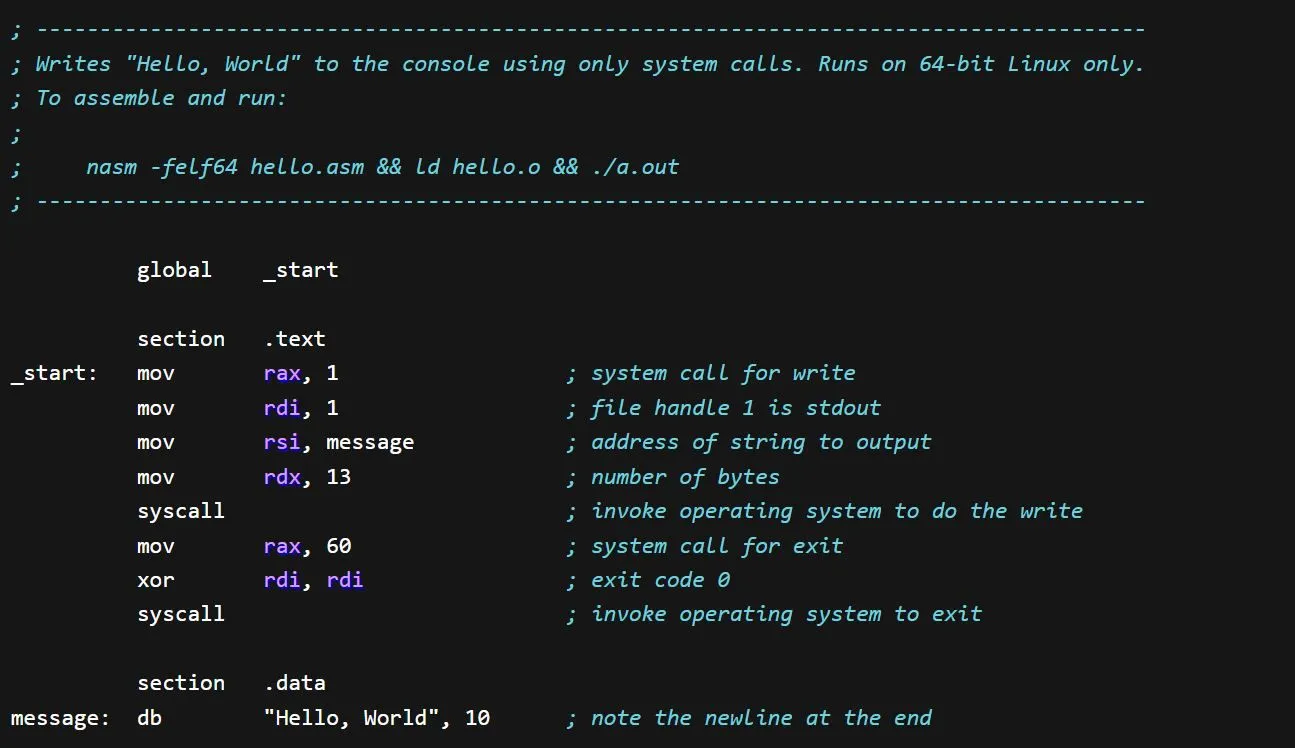
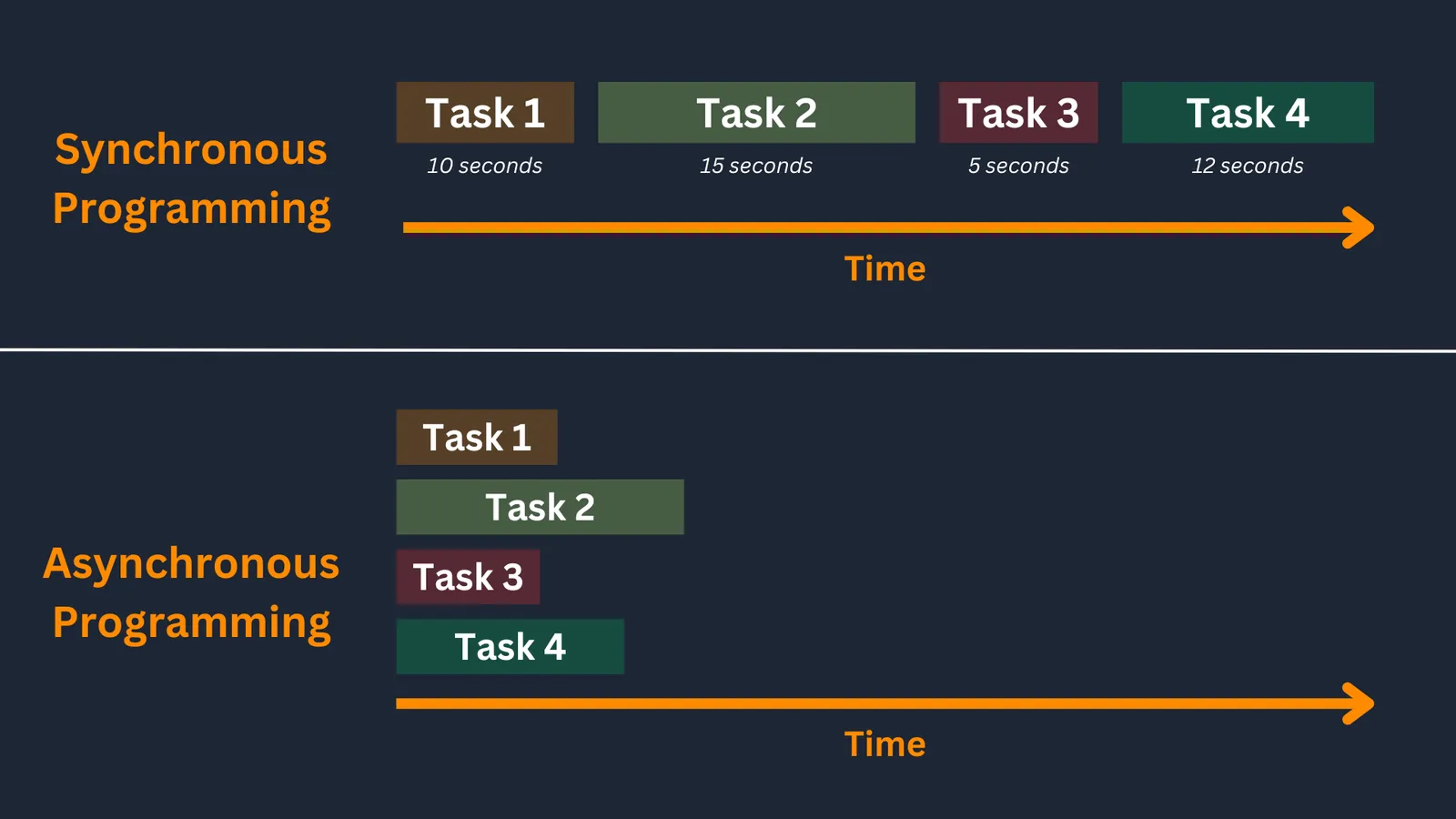
In the early days of programming, life was simple. Code executed line by line, top to bottom, and you always knew exactly where your program was at any given moment. But as applications grew more complex and user expectations evolved, this synchronous approach became a bottleneck. Users just simply didn't want to wait for network requests to complete before they could click another button. Servers needed to handle thousands of concurrent connections without grinding to a halt.
Enter asynchronous programming, a paradigm that has revolutionized how we build modern applications. From JavaScript's event loop to Python's asyncio, from Node.js servers handling millions of requests to mobile apps that never freeze, asynchronous programming has become the backbone of responsive, scalable software.
Yet despite its ubiquity, asynchronous programming remains one of the most challenging concepts for developers to master. It requires a fundamental shift in thinking about program flow, introduces new categories of bugs, and can turn simple operations into complex orchestrations of callbacks, promises, and async functions.
Understanding the Fundamentals: Synchronous vs. Asynchronous
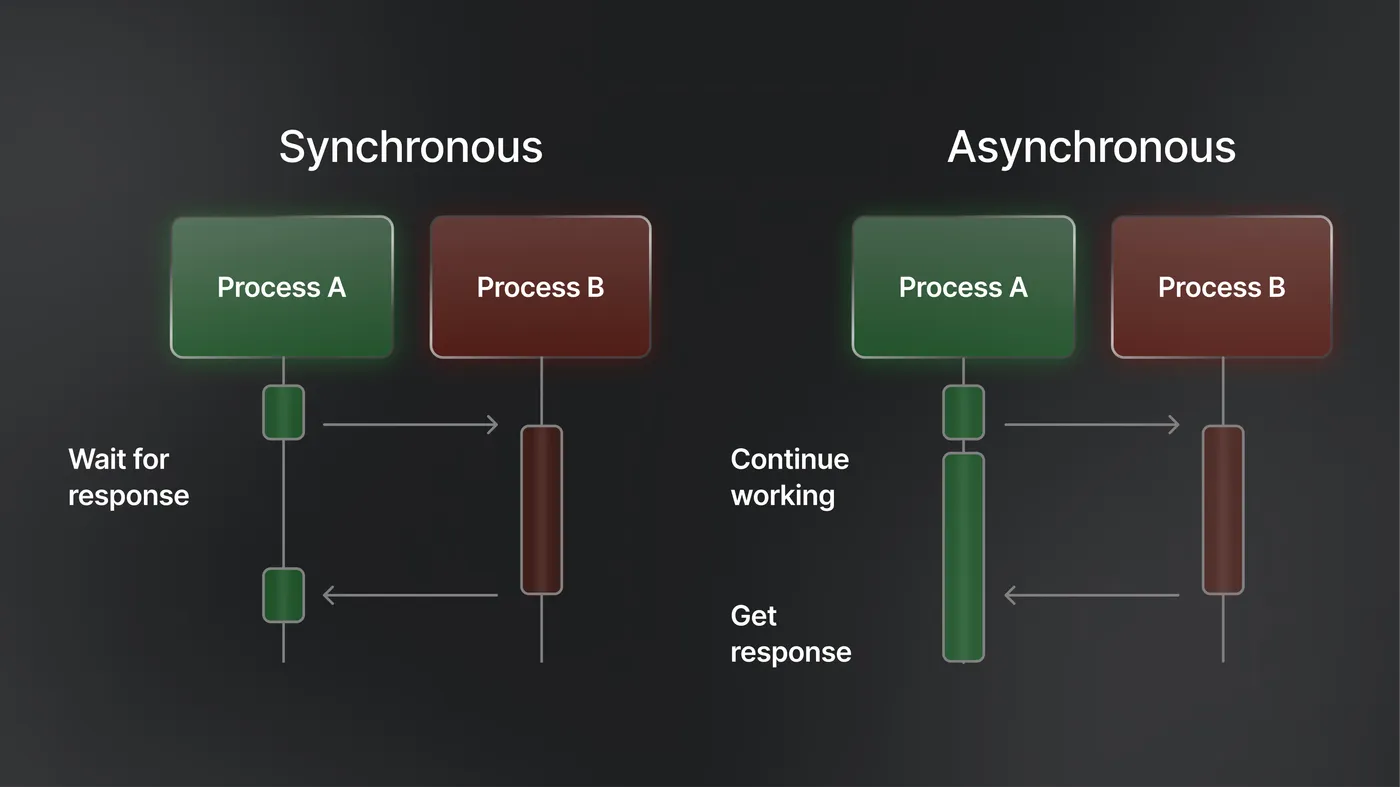
To appreciate asynchronous programming, we must first understand its opposite. Synchronous programming is like a single-threaded conversation—one person speaks, the other listens, then they switch roles. Each operation must complete before the next one can begin.
Consider a simple file-reading operation in synchronous code:
(Oh yeah, I’ll be using Javascripts for this entire blog post)
function processFiles() {
    const data1 = readFileSync("file1.txt"); // Blocks until file is read
    const data2 = readFileSync("file2.txt"); // Blocks until file is read
    const result = processData(data1, data2); // Blocks until processing is done
    return result;
}
This approach is predictable and easy to reason about, but it's also inefficient. While the program waits for the first file to be read from disk, the CPU sits idle. The second file read can't begin until the first is complete, even though these operations are independent.
The codes above is how you would write synchronous code in Javascripts. However, in practical use-cases, we would use asynchronous programming instead, which can be seen below:
async function processFiles() {
    const data1 = await readFile("file1.txt"); // Non-blocking, waits for file to be read
    const data2 = await readFile("file2.txt"); // Non-blocking, waits for file to be read
    const result = await processData(data1, data2); // Non-blocking, waits for processing
    return result;
}
Asynchronous programming breaks the sequential constraint we usually encounter when using the synchronous one. Instead of waiting for each operation to complete, the program can initiate multiple operations and handle their results as they become available. It's like being a skilled waiter who can take orders from multiple tables, put in food orders, deliver drinks, and handle payments all seemingly simultaneously.
The Evolution of Asynchronous Patterns
The journey of asynchronous programming has been marked by several evolutionary stages, each addressing the limitations of its predecessor.
The Callback Era
The earliest approach to asynchronous programming was the callback pattern. Functions would accept callback functions as parameters, invoking them when the asynchronous operation completed:
function fetchUserData(userId, callback) {
    setTimeout(() => {
        const userData = { id: userId, name: "John Doe" };
        callback(null, userData);
    }, 1000);
}

fetchUserData(123, (error, user) => {
    if (error) {
        console.error("Error fetching user:", error);
    } else {
        console.log("User data:", user);
    }
});
Callbacks were revolutionary because they enabled non-blocking operations. However, they quickly led to "callback hell"—deeply nested callback functions that became difficult to read and maintain:
fetchUser(userId, (err, user) => {
    if (err) return handleError(err);

    fetchUserPosts(user.id, (err, posts) => {
        if (err) return handleError(err);

        fetchPostComments(posts[0].id, (err, comments) => {
            if (err) return handleError(err);

            // Finally, do something with the data
            displayUserWithPostsAndComments(user, posts, comments);
        });
    });
});
This pattern became unwieldy as applications grew more complex, leading to code that was hard to read, debug, and maintain.
The Promise Revolution
Promises emerged as a solution to callback hell, providing a more structured approach to handling asynchronous operations. A Promise represents a value that may be available now, in the future, or never. Promises have three states: pending, fulfilled, or rejected.
function fetchUserData(userId) {
    return new Promise((resolve, reject) => {
        setTimeout(() => {
            const userData = { id: userId, name: "John Doe" };
            resolve(userData);
        }, 1000);
    });
}

fetchUserData(123)
    .then(user => {
        console.log("User data:", user);
        return fetchUserPosts(user.id);
    })
    .then(posts => {
        console.log("User posts:", posts);
        return fetchPostComments(posts[0].id);
    })
    .then(comments => {
        console.log("Post comments:", comments);
    })
    .catch(error => {
        console.error("Error:", error);
    });
Promises solved the nesting problem by allowing operations to be chained linearly. They also provided better error handling through the .catch() method, which could handle errors from any point in the chain.
The Async/Await Era
While promises were a significant improvement, they still felt somewhat clunky. The async/await syntax, introduced in ES2017 for JavaScript and adopted by many other languages, finally made asynchronous code look and feel like synchronous code:
async function processUserData(userId) {
    try {
        const user = await fetchUserData(userId);
        const posts = await fetchUserPosts(user.id);
        const comments = await fetchPostComments(posts[0].id);

        return { user, posts, comments };
    } catch (error) {
        console.error("Error processing user data:", error);
        throw error;
    }
}
This syntax is remarkably clean and readable. The await keyword pauses the execution of the function until the Promise resolves, but crucially, it doesn't block the entire thread. Other code can continue executing while this function waits for its asynchronous operations to complete.
The Mechanics: How Asynchronous Programming Works
Understanding how asynchronous programming works under the hood is crucial for writing effective asynchronous code. The key concepts vary slightly between languages, but the fundamental principles remain consistent.
Event Loops and Concurrency
Most asynchronous programming models are built around an event loop—a mechanism that continuously monitors for and dispatches events or messages. JavaScript's event loop is perhaps the most well-known example.
When you make an asynchronous call in JavaScript, the operation is handed off to the browser's Web APIs (or Node.js's C++ APIs). The JavaScript engine continues executing other code while the asynchronous operation proceeds in the background. When the operation completes, a callback is added to the event queue. The event loop continuously checks this queue and executes callbacks when the main thread is free.
This model allows JavaScript to handle thousands of concurrent operations on a single thread, making it incredibly efficient for I/O-bound applications like web servers.
Cooperative vs. Preemptive Multitasking
Asynchronous programming typically uses cooperative multitasking, where functions voluntarily yield control back to the event loop. This is different from preemptive multitasking used in traditional multithreading, where the operating system forcibly switches between threads.
In cooperative multitasking, a function runs until it hits an await point, at which point it yields control. This eliminates many of the race conditions and synchronization issues that plague traditional multithreaded programming, but it also means that a single long-running synchronous operation can block the entire event loop.
Different Models Across Languages
While the principles are similar, different languages implement asynchronous programming differently:
JavaScript: Uses a single-threaded event loop with callback queues and microtask queues. All asynchronous operations are non-blocking.
Python: The asyncio library provides an event loop similar to JavaScript's, but Python also supports traditional threading and multiprocessing alongside async/await.
C#: The Task Parallel Library (TPL) and async/await keywords provide a robust asynchronous programming model that can utilize multiple threads transparently.
Go: Uses goroutines and channels for concurrent programming, providing a different but highly effective approach to asynchronous operations.
Rust: Provides async/await syntax with a focus on zero-cost abstractions and memory safety, requiring explicit runtime selection.
Real-World Applications and Use Cases
Web Servers and APIs
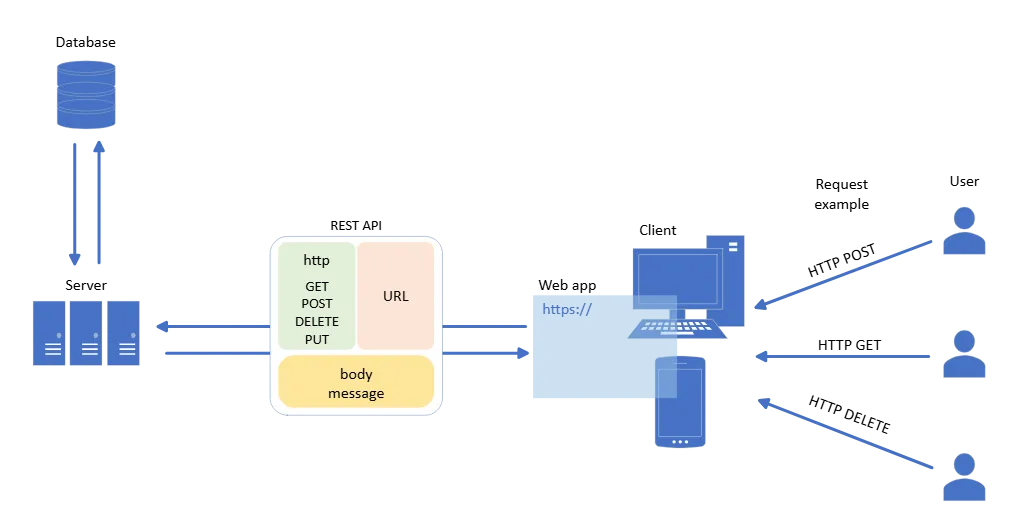
Modern web servers handle thousands of concurrent requests. Without asynchronous programming, each request would require its own thread, quickly exhausting system resources. Asynchronous servers can handle many more concurrent connections with far fewer resources.
Node.js exemplifies this approach. A single Node.js process can handle tens of thousands of concurrent connections, making it ideal for real-time applications like chat servers, gaming backends, and collaborative editing tools.
User Interfaces
Asynchronous programming is essential for responsive user interfaces. When a user clicks a button that triggers a network request, the UI must remain responsive while the request is in progress. Asynchronous programming allows the UI to update, respond to user input, and handle the network response when it arrives.
Modern frontend frameworks like React, Vue, and Angular are built with asynchronous programming at their core, enabling smooth user experiences even when dealing with complex state management and multiple API calls.
Data Processing and ETL
Extract, Transform, Load (ETL) operations often involve processing large datasets with multiple I/O operations. Asynchronous programming can significantly improve performance by allowing multiple operations to proceed in parallel.
For example, while one batch of data is being transformed, another batch can be extracted from the source, and a third batch can be loaded into the destination. This pipelining approach can reduce total processing time dramatically.
Microservices and Distributed Systems
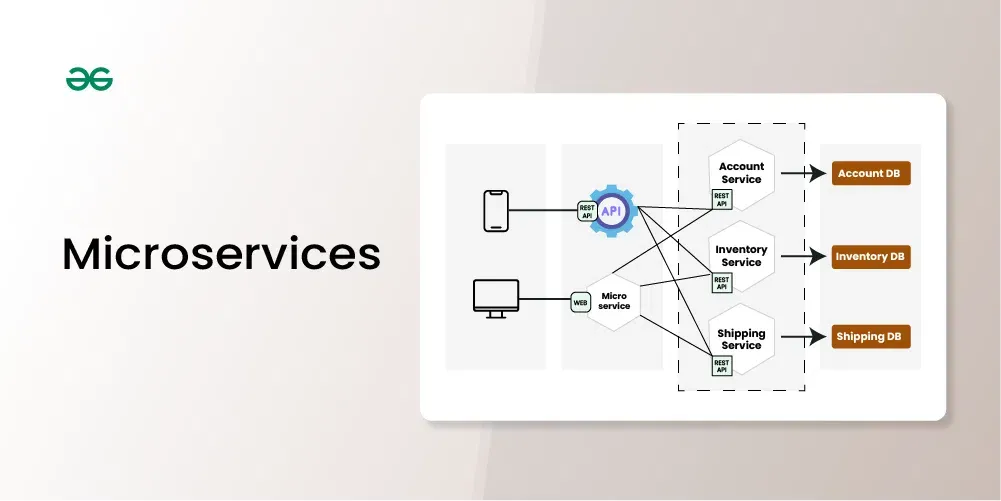
In microservices architectures, services frequently communicate with each other over networks. Asynchronous programming allows services to make multiple upstream requests concurrently, reducing latency and improving overall system performance.
Service mesh technologies like Istio and distributed tracing systems rely heavily on asynchronous programming to handle the complex web of inter-service communications without blocking operations.
Common Pitfalls and How to Avoid Them
Asynchronous programming introduces several categories of bugs and design issues that don't exist in synchronous code:
Race Conditions
Even in single-threaded asynchronous code, race conditions can occur when the order of operations depends on the timing of asynchronous events:
let counter = 0;

async function incrementCounter() {
    const current = counter;
    await someAsyncOperation();
    counter = current + 1;
}

// These calls might not increment counter correctly
incrementCounter();
incrementCounter();
The solution is to be mindful of shared state and use appropriate synchronization mechanisms when necessary.
Forgotten Await Keywords
One of the most common mistakes in async/await code is forgetting the await keyword:
async function processData() {
    const data = fetchData(); // Missing await!
    console.log(data); // This logs a Promise, not the actual data
}
This bug can be subtle because the code might appear to work in some cases, making it hard to catch during testing.
Blocking the Event Loop
Long-running synchronous operations can block the event loop, making the entire application unresponsive:
async function badExample() {
    const data = await fetchData();

    // This synchronous loop blocks the event loop
    for (let i = 0; i < 1000000000; i++) {
        // Expensive computation
    }

    return processedData;
}
The solution is to break up long-running operations into smaller chunks or use worker threads for CPU-intensive tasks.
Memory Leaks from Unhandled Promises
Promises that are created but never properly handled can lead to memory leaks:
function createDanglingPromise() {
    fetchData(); // Promise created but never handled
}
Always ensure that promises are properly awaited or have appropriate error handling.
Performance Considerations and Optimization
Asynchronous programming can significantly improve application performance, but it requires several factors that you should definitely considerate.
Concurrency vs. Parallelism
Understanding the difference between concurrency and parallelism is crucial. Concurrency is about dealing with multiple tasks at once, while parallelism is about executing multiple tasks simultaneously. Most asynchronous programming provides concurrency on a single thread, which is excellent for I/O-bound operations but doesn't help with CPU-bound tasks.
Batching and Bundling
When making multiple similar asynchronous operations, batching them can improve performance:
// Instead of making individual requests
const user1 = await fetchUser(1);
const user2 = await fetchUser(2);
const user3 = await fetchUser(3);

// Batch the requests
const users = await Promise.all([
    fetchUser(1),
    fetchUser(2),
    fetchUser(3)
]);
Backpressure and Rate Limiting
In high-throughput systems, it's important to implement backpressure mechanisms to prevent overwhelming downstream systems:
const queue = [];
const maxConcurrency = 10;
let running = 0;

async function processWithBackpressure(item) {
    if (running >= maxConcurrency) {
        await new Promise(resolve => queue.push(resolve));
    }

    running++;
    try {
        return await processItem(item);
    } finally {
        running--;
        if (queue.length > 0) {
            queue.shift()();
        }
    }
}
Testing Asynchronous Code
Testing asynchronous code can presents some “unique” challenges. Traditional testing frameworks weren't really designed for asynchronous operations, leading to flaky tests and hard-to-debug issues.
Nevertheless, There are some modern testing frameworks that provide better support for asynchronous code, which can be seen below:
// Jest example
test('async function returns correct data', async () => {
    const result = await fetchUserData(123);
    expect(result.name).toBe('John Doe');
});

// Mocha example
it('should handle async operations', async function() {
    const result = await processData();
    assert.equal(result.status, 'success');
});
While testing, there are some key strategies that you should know:
- Always return promises or use async/await in test functions
- Use proper mocking for external dependencies
- Test both success and failure scenarios
- Consider using tools like sinon for controlling time in tests
All of these sound cliche, I know, since you would need to do almost the same for any kind of tests. I mean, testing and debugging your asynchronous codes at 2 am in the morning for a homework that would be 20% of your grade may not sound too pleasant at first, but you’ll get used to it. Just like any other programming experience…
Conclusion
Asynchronous programming has transformed from a niche optimization technique to a fundamental skill for modern developers. Whether you're building web applications, mobile apps, or distributed systems, understanding how to effectively write asynchronous code is essential.
The journey from callbacks to async/await represents more than just syntactic sugar, it actually reflects our growing understanding of how to build responsive, scalable applications. Each evolutionary step has made asynchronous programming more accessible and less error-prone, enabling developers to focus on business logic rather than the intricacies of concurrent execution.
As applications continue to grow in complexity and users expect ever-more responsive experiences, asynchronous programming will only become more important. The developers who understanding not just the syntax but the underlying principles and patterns will be best positioned to build the next generation of software (maybe).
The key to mastering asynchronous programming lies in understanding that it's not just about making code run faster, it's about fundamentally changing how we think about program flow, error handling, and system design. It requires patience, practice, and a willingness to embrace a different mental model of how programs execute.
But for those who make the investment, the rewards are substantial: applications that scale gracefully, user interfaces that never freeze, and systems that can handle the demands of our increasingly connected world. In the end, asynchronous programming is not just a technical skill, it's a way of thinking that opens up new possibilities for what software can achieve.
Read more at: Lazzerex’s Blog
Source: Published Notion page
This article
Post Reactions
Join the conversation
Write a Comment
Share your thought about this article.
Comments
Loading comments...