Model Context Protocol: The New Standard Reshaping API Development for the AI Era
Introduced by Anthropic in November 2024, Model Context Protocol, or MCP for short, has provided a new standard for AI assistants to connect to data systems.
Contents
- Introduction
- Understanding Model Context Protocol
- The Paradigm Shift: From Traditional APIs to AI-Native Interfaces
- How MCP Works: A Client-Server Architecture for AI
- Resources: Read-Only Data Access
- Tools: Action-Oriented Functions
- Schema Validation: The Key to Reliability
- MCP in Action
- Implementation Guide: Building Your First MCP Server
- Setting Up the Development Environment
- Defining Resources
- Creating Tools
- Deployment and Integration
- Client Configuration: Connecting AI to Your Server
- Claude Desktop Setup
- Using the Integration
- The Future of AI-Powered Development
- Best Practices for MCP Implementation
- Conclusion: Embracing the AI-Native Future
- Read more at: Lazzerex’s Blog
Introduced by Anthropic in November 2024, Model Context Protocol, or MCP for short, has provided a new standard for AI assistants to connect to data systems. This blog post is inspired by Fireship’s video: I gave Claude root access to my server... Model Context Protocol explained. If you're interested in tech news and trends, please consider supporting their YouTube channel, they’ve been a big inspiration for this blog.
Introduction
The developer world is buzzing about Model Context Protocol (MCP), and the excitement is justified. This emerging standard for building APIs has quickly gained momentum, becoming an official standard in the OpenAI agents SDK just a while ago. For developers familiar with REST, GraphQL, RPC, or even SOAP, MCP represents a fundamental shift in how we think about API architecture in an AI-driven world.
Understanding Model Context Protocol
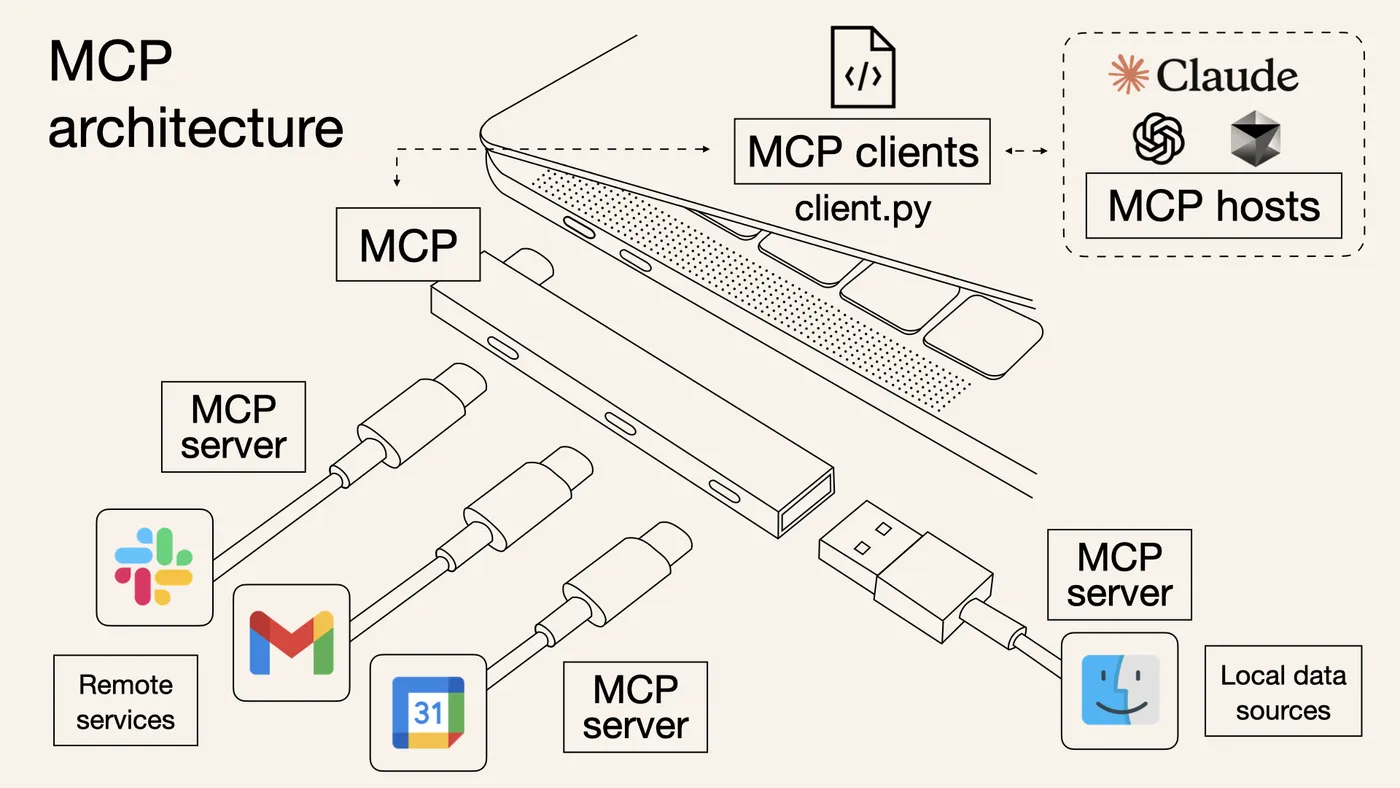
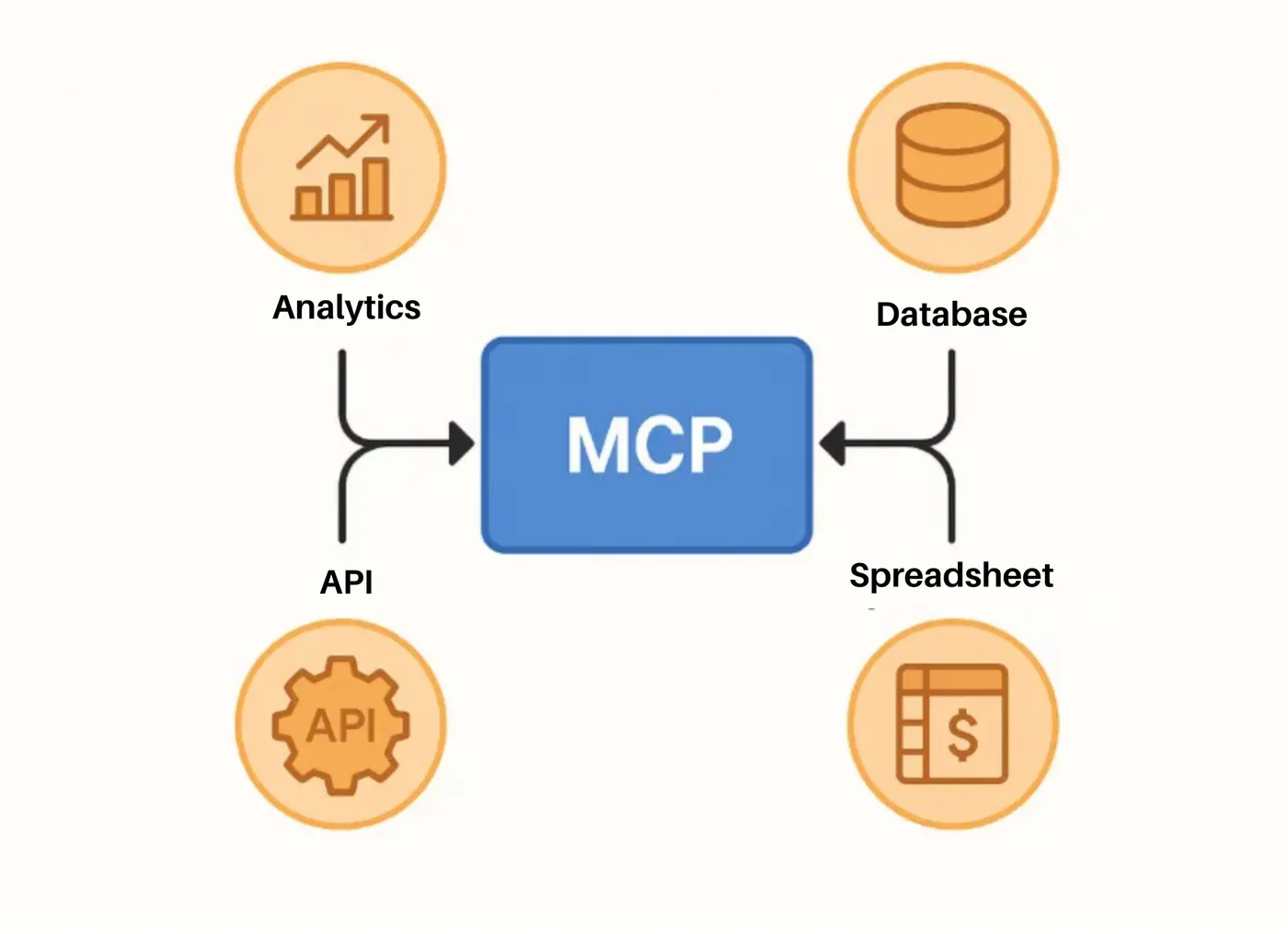
Model Context Protocol is a standardized way to connect AI models with external data and systems. Think of it as a "USB-C port for AI applications" - a universal interface that allows large language models to seamlessly interact with your existing infrastructure.
Developed by Anthropic, the team behind Claude, MCP addresses a critical need: giving LLMs structured access to real-world data and the ability to perform actions beyond text generation.
The Paradigm Shift: From Traditional APIs to AI-Native Interfaces
MCP represents more than just another API standard, it's part of a broader movement toward what called "vibe coding," where developers focus on outcomes rather than implementation details, leveraging AI to handle the heavy lifting of code generation and system integration.
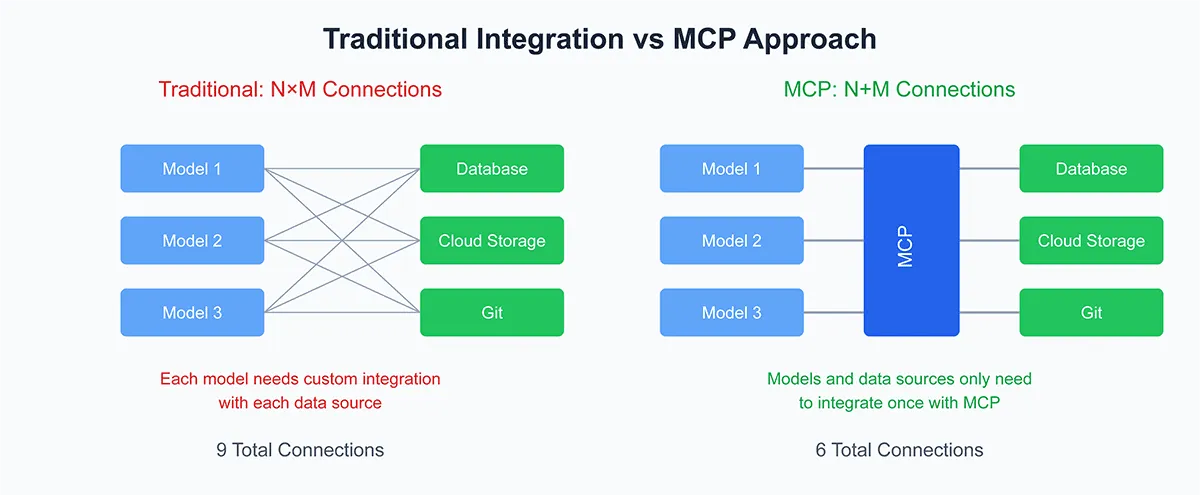
This shift is significant because it democratizes complex integrations by abstracting away traditional API complexity, enables AI agents to work with real data rather than just training data, and provides a standardized approach for connecting any AI model to any system. The result is a dramatically reduced barrier to entry for building AI-powered applications.
How MCP Works: A Client-Server Architecture for AI
MCP follows a familiar client-server pattern, but with AI-specific optimizations:
The client (such as Claude Desktop, Cursor, or Wisor) initiates requests and manages the AI interaction. You can even build custom clients for specific use cases.
Meanwhile, developers build MCP servers that expose two main types of interfaces:
Resources: Read-Only Data Access
Resources provide contextual information to AI models without side effects:
- Database queries for background information
- File contents for analysis
- Configuration data for decision-making
- Historical data for pattern recognition
Think of resources as GET requests in REST, they fetch data but don't modify anything.
Tools: Action-Oriented Functions
Tools enable AI models to perform actions and modify system state:
- Database writes and updates
- File uploads and modifications
- API calls to external services
- System administration tasks
Tools are like POST/PUT/DELETE requests in REST, they have side effects and change system state.
Schema Validation: The Key to Reliability
One of MCP's most important features is its emphasis on structured data validation. Using tools like Zod, developers define precise schemas that prevent AI hallucination by constraining possible inputs, ensure data integrity across system boundaries, provide clear interfaces for AI models to understand, and enable automatic error handling and validation.
This validation layer is crucial for production systems where reliability matters more than flexibility.
MCP in Action
The early adopters of MCP are already pushing boundaries across multiple domains. In applications development, it’s not rare to see AI-powered 3D design using Blender integration, automated content generation with access to brand guidelines and assets, and dynamic web development where AI modifies code and deploys changes in real-time.
Business automation represents another major area of innovation. Companies are implementing automated trading systems that analyze market data and execute trades, infrastructure management tools that handle Kubernetes cluster operations, and data processing pipelines that scale based on AI decision-making.
Development workflows are also being transformed through code generation with context from existing codebases, automated testing that understands application logic, and documentation generation that stays current with code changes.
Implementation Guide: Building Your First MCP Server
You can refer to the instruction below if you want to build an MCP server. I will use TypeScript because why not.
Setting Up the Development Environment
import { MCPServer } from '@modelcontextprotocol/sdk';
import { z } from 'zod';

const server = new MCPServer();
Defining Resources
server.addResource(
  'user-profiles',
  'postgresql://users',
  async () => {
    // Fetch user data from database
    return await db.query('SELECT * FROM users WHERE active = true');
  }
);
Creating Tools
const CreateMatchSchema = z.object({
  user1_id: z.number(),
  user2_id: z.number(),
  match_type: z.enum(['casual', 'serious'])
});

server.addTool(
  'create-match',
  'Create a new user match',
  CreateMatchSchema,
  async (params) => {
    // Validate input using Zod schema
    const validatedParams = CreateMatchSchema.parse(params);

    // Execute the action
    return await matchService.createMatch(validatedParams);
  }
);
Deployment and Integration
For local development, use Standard IO transport:
server.run('stdio');For production deployments, consider Server-Sent Events or HTTP transport for better scalability and monitoring.
Client Configuration: Connecting AI to Your Server
Claude Desktop Setup
- Install Claude Desktop
- Navigate to Developer Settings
- Add your MCP server configuration:
{ "servers": { "my-app": { "command": "deno", "args": ["run", "--allow-all", "main.ts"] } }}- Restart Claude Desktop
Using the Integration
Once configured, you can attach resources to provide context for AI responses, grant permissions for AI to execute tools, combine multiple data sources for comprehensive analysis, and chain operations across different systems.
The Future of AI-Powered Development
MCP opens up tremendous opportunities, including faster development cycles through AI assistance, more accessible development for non-technical users, automated maintenance and optimization of existing systems, and intelligent scaling and resource management.
However, these opportunities come with important challenges that must be addressed. Teams need to ensure AI agents don't accidentally corrupt or delete critical data, maintain human oversight over important system changes, balance automation with security and compliance requirements, and manage the complexity of AI-driven systems effectively.
Best Practices for MCP Implementation
When implementing MCP, security should be your first priority. This means implementing proper authentication and authorization, using least-privilege access principles, monitoring AI actions and maintaining audit logs, and testing extensively in isolated environments before deploying to production.
Designing for reliability is equally important. Use comprehensive schema validation to prevent errors, implement proper error handling and rollback mechanisms, design idempotent operations where possible, and plan for graceful degradation when AI services are unavailable.
Finally, start small and scale thoughtfully. Begin with read-only resources before implementing tools, test with non-critical systems first, and gradually expand AI permissions as confidence grows. Monitor performance continuously and adjust resource allocation accordingly.
Conclusion: Embracing the AI-Native Future
Model Context Protocol represents a fundamental shift in how we build applications in an AI-first world. By providing a standardized way for AI models to interact with real systems, MCP enables a new generation of applications that are more intelligent, responsive, and capable than ever before.
The technology is still evolving, and the ecosystem of tools and integrations continues to grow. Developers who invest time in understanding MCP now will be well-positioned to build the next generation of AI-powered applications.
As we move forward, the key is to embrace this new paradigm while maintaining the engineering discipline and best practices that ensure reliable, secure, and maintainable systems. The future of development may indeed be AI-powered, but it will still require thoughtful human guidance and oversight.
For those ready to explore this new frontier, the MCP ecosystem offers a wealth of resources and examples. Just remember to approach this powerful technology with both enthusiasm and responsibility, the future of development depends on it.
Read more at: Lazzerex’s Blog
Source: Published Notion page
This article
Post Reactions
Join the conversation
Write a Comment
Share your thought about this article.
Comments
Loading comments...