What It's Like to Build an App with Topcoat
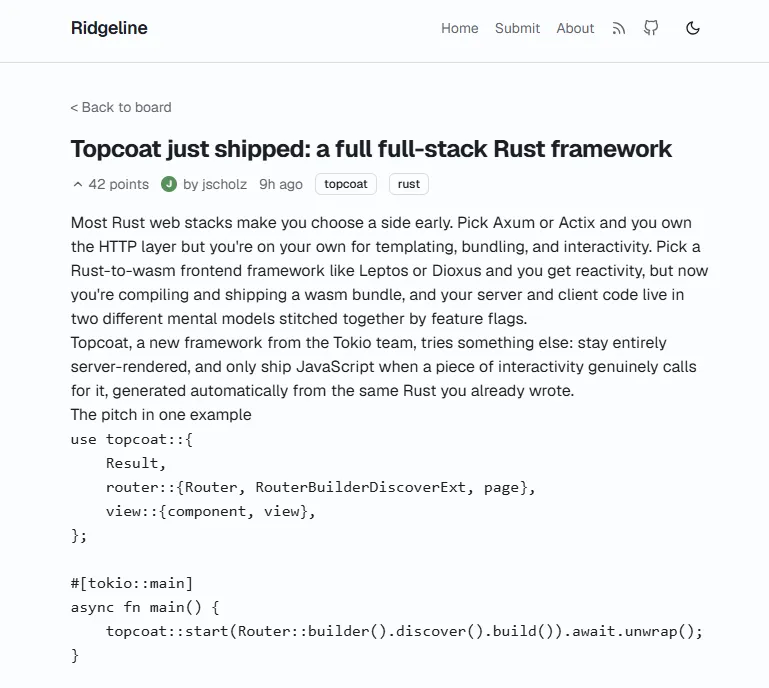
The Tokio team released Topcoat last week. I wanted to know what it actually feels like to build something real with it before forming any opinions, so I skipped the hello world and built Ridgeline instead. It’s a small Hacker News-style link and discussion board with a front page ranked by score, tag filtering, live search, threaded comments, a submission form, and an RSS feed. Enough surface area to hit real edges. The project is at https://github.com/lazzerex/ridgeline with Topcoat pulled in as a path dependency pinned to local source since the framework is pre-1.0 and still moving fast.

Contents
- Where Topcoat Sits in the Rust Web Ecosystem
- The App
- Reactivity Without a Client-Side Framework
- A Closer Look at the Code
- Typed Path and Query Parameters
- Shards: Server-Rendered Fragments, Refetched Over the Network
- A Typed Cookie Store and a Process Epoch Footgun
- #[memoize] for Values Read Multiple Times Per Request
- Recursive Comments, Boxed at the One Recursive Call
- Plain Forms, Server-Side Validation, Post/Redirect/Get
- Composable Component Classes Without a CSS-in-JS Runtime
- The Bugs
- Bug 1: asset!() Loses Its Scanner Marker in a Binary Crate
- Bug 2: One Hydration Exception Kills the Entire Page
- Bug 3: The Signal-in-a-Loop Bug That Was Not One
- Bug 4: Non-move Closures and the Borrow They Cannot Escape
- Bug 5: A Borrowed Error Cannot Cross ?
- A Sixth Thing, Not a Framework Bug
- Topcoat Against the Alternatives
- What Ended Up Demonstrated
- Would I Use It Again
Where Topcoat Sits in the Rust Web Ecosystem
The Rust web ecosystem already has good answers to most problems, and Topcoat is solving a specific one that the existing options handle awkwardly.
Axum is what you reach for when you are building HTTP APIs. It is lower-level, composable, sits cleanly on Tower, and the Tokio team themselves are explicit about this: Topcoat and Axum cover different ground, and many Topcoat apps will use both. No conflict there.
Leptos and Dioxus are the two leading full-stack Rust frameworks, and both work by compiling Rust to WebAssembly and running it in the browser. That is genuinely the right approach for highly interactive applications where you want shared types across the client/server boundary and fine-grained reactive updates. For a lot of apps, though, it is more than you need. WASM bundles, separate build targets, serializing data across the client/server split. The overhead compounds quickly when most of your UI is server-rendered HTML with a button that occasionally does something. Dioxus also offers a single codebase that targets web, desktop, mobile, and TUI, which is a meaningful advantage for teams building cross-platform tools. For a web-only app, that flexibility comes with surface area you are not using.
Topcoat's position is closer to Rails or Phoenix than to either of those. Everything renders on the server. Components can be async, query the database directly, and check permissions without any API layer. For interactivity, rather than compiling to WASM, Topcoat cross-compiles a subset of type-checked Rust expressions to JavaScript at build time. A small JS runtime walks the DOM on load, wires up the reactive graph, and handles updates from there. No WASM bundle, no separate client build step, no manual JSON serialization between server and browser.
The App
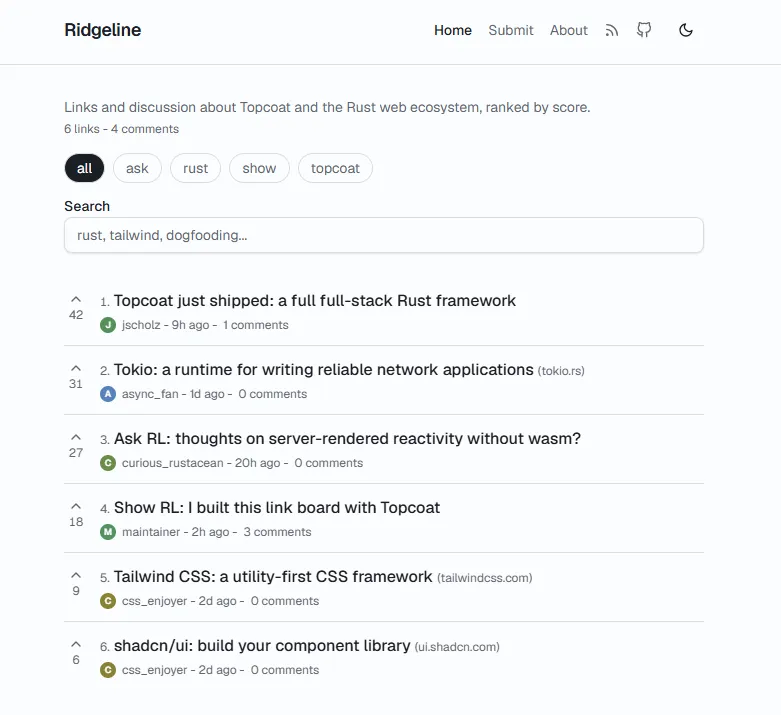
Ridgeline has no database. Everything lives in an in-memory Board struct behind a couple of Mutexes, seeded on startup and reset on restart. That was a deliberate choice. The point of the project was the framework, not the persistence layer, and Topcoat's app_context handles exactly this shape of state: something shared across every request, wired up once at startup.
pub fn router() -> topcoat::router::RouterBuilder {
    topcoat::router::module_router!()
}
That one line is most of the routing story. module_router!() walks the module tree and registers every #[page], #[layout], #[layer], and #[route] it finds, so the file structure is the route table:
src/app.rs               ->  /                    root layout + front page
src/app/items.rs         ->  nested layout for /items/*
src/app/items/id.rs      ->  /items/{item_id}     detail, comment, upvote
src/app/submit.rs        ->  /submit              form + create
src/app/about.rs         ->  /about
src/app/api/health.rs    ->  /api/health
src/app/rss.rs           ->  /rss.xml
A folder named id under items/ becomes the {item_id} path parameter automatically. There is no route table to keep in sync with the actual handlers by hand, which feels like a small thing until you have spent an afternoon debugging a route registered twice under two different paths somewhere else.
Reactivity Without a Client-Side Framework
The thing I actually came to test was Topcoat's answer to client interactivity without a SPA. The model has three pieces.
signal declares a piece of reactive state inside a view! block, with an id and a value serialized into the HTML as it renders. #[procedure] is an async server function exposed at an HTTP endpoint, callable from a browser event handler like a normal async function call. #[shard] is a server-rendered fragment that re-fetches itself over the network whenever a tracked signal it depends on changes, then replaces its own DOM region.
None of this touches WebAssembly. A small JavaScript runtime walks the DOM on load, finds the comment markers Topcoat left behind during server rendering, and wires up signals and event handlers to a client-side reactive graph (Maverick Signals underneath). The Rust side of an event handler gets transpiled to an equivalent JavaScript expression at compile time. It is not shipped as Rust or run through WASM.
Here is the live upvote button from the front page, after converting it from a full-page-reload form post to an in-place update:
signal item_id = item.id as f64;
signal score = f64::from(item.score);
signal voted = already_voted;

<button
    aria-label="Upvote"
    :disabled=$(voted.get())
    :class=$(if voted.get() {
        "... text-primary animate-vote-pop"
    } else {
        "... text-muted-foreground"
    })
    @click=$(async |_e| {
        score.set(upvote_item(item_id.get()).await);
        voted.set(true);
    })
>
    icon(data: feather::CHEVRON_UP, size: 16)
</button>
<span class="text-xs tabular-nums text-muted-foreground">$(score.get())</span>
upvote_item is a #[procedure] defined once, elsewhere, as a plain async function taking &Cx and an f64. Calling it from the click handler compiles to a fetch() to a generated endpoint. Awaiting it resolves to the typed return value, no manual JSON wrangling, no separate client SDK to keep in sync with the server API. When it works, it is a genuinely pleasant way to write interactivity. Server-side data access and validation come free, and the signal model is close enough to what a frontend developer already knows that it does not feel foreign.
A Closer Look at the Code
The upvote button is the flashy part. Most of the app is quieter, and that is where a framework's day-to-day ergonomics actually show up.
Typed Path and Query Parameters
The id module under items/ declares a path parameter struct, and because it lives inside the module tree, that module's own segment becomes {item_id} automatically:
#[path_param(error = not_found)]
struct ItemId(u64);

#[query_params]
struct ItemError {
    error: Option<String>,
    created: Option<String>,
}

#[page]
async fn item_detail(cx: &Cx) -> Result {
    let item_id = *path_param::<ItemId>(cx)?;
    let board: &Board = app_context(cx);
    let item = board.get_item(item_id).ok_or_not_found()?;
    ...
error = not_found means a malformed or missing path parameter short-circuits straight to Topcoat's NotFoundError, no manual match needed. query_params::<ItemError>(cx) reads ?error=... and ?created=... off the URL into a typed struct via serde, the same shape you would use for a JSON request body, just applied to the query string.
Shards: Server-Rendered Fragments, Refetched Over the Network
Live search and tag filtering both narrow the same list without a full page reload. The entire list is a #[shard], a function that renders like any other view but is invoked from the page with tracked signal expressions as its arguments:
#[shard]
async fn front_page_items(cx: &Cx, query: String, tag: String) -> Result {
    let board: &Board = app_context(cx);
    let needle = query.trim().to_lowercase();

    let items: Vec<_> = board
        .ranked_items(&tag)
        .into_iter()
        .filter(|item| needle.is_empty() || item.title.to_lowercase().contains(&needle))
        .collect();

    view! {
        if items.is_empty() {
            <p class="text-sm text-muted-foreground">"No items match that search."</p>
        }
        <ol class="flex flex-col">
            for (index, item) in items.into_iter().enumerate() {
                ...
            }
        </ol>
    }
}
Mounted from the page with:
front_page_items(query: $(search.get()), tag: $(active_tag.clone()))Every keystroke updates the search signal. The shard is subscribed to it, refetches its own HTML from the server, and swaps its own DOM region. Nothing else on the page re-renders. No client-side state management, no hand-written fetch-and-diff logic.
A Typed Cookie Store and a Process Epoch Footgun
Votes are tracked in a cookie, decoded through Topcoat's typed cookie store rather than hand-parsing a header:
#[derive(Default, Serialize, Deserialize)]
struct Votes {
    epoch: u64,
    ids: Vec<u64>,
}

pub(crate) fn has_voted(cx: &Cx, item_id: u64) -> bool {
    let board: &Board = app_context(cx);
    let store = cookie_store::<Votes, _>(cookies(cx), "votes").parse_or_default();
    let votes = store.read();
    votes.epoch == board.epoch() && votes.ids.contains(&item_id)
}
The epoch field guards against a subtle bug. The votes cookie persists across server restarts, but the in-memory Board does not. Without the epoch check, a browser that voted before a restart would return with a cookie claiming it had already voted on items the fresh Board knows nothing about, silently disabling the upvote button forever. Board stamps itself with a random epoch at startup; a cookie from a previous run carries the old epoch, fails the comparison, and gets treated as a clean slate.
#[memoize] for Values Read Multiple Times Per Request
#[memoize]
fn theme(cx: &Cx) -> &'static str {
    match cookies(cx).get("theme") {
        Some(cookie) if cookie.value() == "dark" => "dark",
        _ => "light",
    }
}
theme(cx) gets called from the root layout and from the toggle_theme procedure. #[memoize] caches the result against the request context, so the cookie jar only gets parsed once per request regardless of how many call sites ask for it, without threading the computed value through function signatures by hand.
Recursive Comments, Boxed at the One Recursive Call
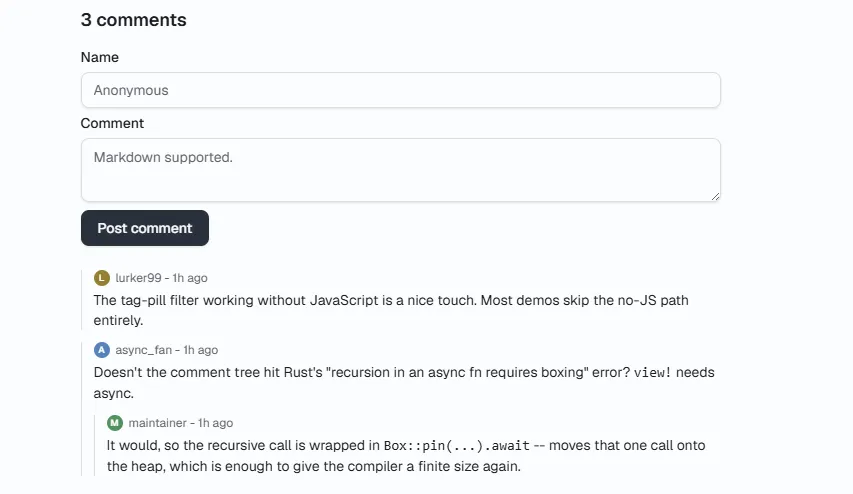
Comments nest, but view! needs an async function, and Rust rejects unbounded recursion in an async fn because the compiler cannot compute a finite stack frame size. The fix is Box::pin, applied at exactly the one recursive call:
pub async fn render_comments(cx: &Cx, comments: &[Comment], parent_id: Option<u64>, depth: u32) -> Result {
    let children: Vec<&Comment> = comments.iter().filter(|c| c.parent_id == parent_id).collect();

    let mut rendered: Vec<(&Comment, View)> = Vec::with_capacity(children.len());
    for comment in children {
        let subtree = Box::pin(render_comments(cx, comments, Some(comment.id), depth + 1)).await?;
        rendered.push((comment, subtree));
    }

    view! {
        cx =>
        for (comment, subtree) in rendered {
            <div class="mt-3 border-l border-border pl-3">
                ...
                (subtree)
            </div>
        }
    }
}
Moving just the recursive call onto the heap gives the compiler a finite size for the rest. Everything else is ordinary async Rust.
Plain Forms, Server-Side Validation, Post/Redirect/Get
Signals are not always the right tool. Submitting a new item is a plain HTML form post; validation happens on the server, and a failure redirects back to the form with an error flag rather than rendering an error page in place of the form the user just filled out:
#[route(POST)]
async fn create_item(cx: &Cx, Form(form): Form<NewItem>) -> Result<SeeOther> {
    if form.title.trim().is_empty() {
        return Ok(see_other("/submit?error=empty_title"));
    }

    let board: &Board = app_context(cx);
    let id = board.submit_item(form.title, url, body, author);
    Ok(see_other(&format!("/items/{id}?created=1")))
}
?created=1 on success gets read back on the item page to show a one-shot "submitted" banner. The whole flow works with JavaScript disabled. The signal/procedure interactivity elsewhere in the app is additive, not load-bearing for the core actions.
Composable Component Classes Without a CSS-in-JS Runtime
UI components follow the same shape throughout: a base class string shared by every variant, a per-variant class string, and a class!() macro that merges them with whatever the caller passes in, at render time, in Rust:
const BASE: &str = "inline-flex shrink-0 items-center justify-center border \
    font-medium whitespace-nowrap transition-all outline-none select-none \
    focus-visible:ring-2 focus-visible:ring-ring ... active:scale-[0.97]";

#[component]
pub async fn button(
    #[default] variant: ButtonVariant,
    #[default] size: ButtonSize,
    #[default] mut attrs: Attributes,
    #[default] child: View,
) -> Result {
    view! {
        <button class=(class!(BASE, variant.classes(), size.classes(), attrs.remove("class"))) (attrs)>
            (child)
        </button>
    }
}
Every button(...) call site can still pass its own class, and it gets appended rather than clobbering the base styling. That is what makes it possible to add active:scale-[0.97] press feedback once in BASE and have every button in the app pick it up for free.
The Bugs
And of course, we have to talk about the bugs too, which is understandable since Topcoat is still in a really early development stage.
Bug 1: asset!() Loses Its Scanner Marker in a Binary Crate
Topcoat's asset system scans the crate at build time for asset!("path/to/file") calls and bundles what it finds. On Windows/MSVC, that scanner marker does not survive when asset!() is called from a binary crate, reproduced with the framework's own unmodified examples/asset. The workaround was to serve the Tailwind build output and the favicon through two hand-rolled routes using include_str!/include_bytes! rather than going through Asset/AssetBundle. Assets declared inside library crates are not affected; only the binary-crate case hits this.
Bug 2: One Hydration Exception Kills the Entire Page
This was the big one. A good example of a bug that presents as three or four unrelated bugs before you find the actual root cause.
The symptoms were scattered. The dark mode toggle did not work. The item-detail upvote button did not work. The live search box did not filter anything. None of them threw a visible error in the obvious place, and none of them were related to each other in the code. Prime conditions for going down the wrong path.
I built a small headless-browser harness with Puppeteer against a locally running dev server specifically to stop guessing and start reading real console output. First real signal: a pageerror on every page load, Unknown signal id: <uuid>, before any click had happened.
Tracing that id back to the rendered HTML pinned it to a signal declared in the root layout for the scroll-progress bar:
view! {
    <!DOCTYPE html>
    signal dark_signal = dark;
    signal progress = 0.0;

    <html lang="en" :class=$(if dark_signal.get() { "dark" } else { "" })>
        <head> ... </head>
        <body @scroll=$(...) ...>
That reads reasonably: dark_signal has to be declared before <html> uses it, because Rust requires a binding before a reference. The problem is what it produces in the actual HTML. The signal statement renders an HTML comment marker at exactly the position it appears in the view! block, which here is before the <html> tag, outside <body> entirely.
Topcoat's browser runtime boots with:
new Runtime().start(document.body);It only walks document.body. A signal marker sitting before <html> is invisible to the hydration scanner. The first element inside <body> that reads that signal calls registry.handle(id), finds nothing, and throws synchronously in the middle of a flat DOM tree-walk with no error boundary. One exception, and every handler and binding scheduled to attach after that point in document order never attaches.
The fix was to stop treating "declared before use" (a Rust-level constraint) as equivalent to "positioned early in the document" (a hydration-scope constraint). Moving the signals inside <body> and binding the dark-mode class and scroll listener to a wrapper <div> instead of <html>/<body> themselves was enough:
<body>
    signal dark_signal = dark;
    signal progress = 0.0;

    <div :class=$(if dark_signal.get() { "dark ..." } else { "..." }) @scroll=$(...)>
All three "unrelated" bugs disappeared at once.
Bug 3: The Signal-in-a-Loop Bug That Was Not One
An earlier debugging session had concluded that declaring a signal inside a for loop breaks hydration, and had worked around it by falling back to a plain HTML form for the front-page upvote button. That conclusion was reached while bug 2 was still active and unexplained, so I did not inherit it. Re-testing after the root cause was fixed, with signals per list item inside the loop each with their own id wired to their own click handlers, produced zero console errors. Score updates in place, no navigation. It was never a loop problem. Bug 2 in disguise.
The broader lesson: when a debugging session under a broken baseline concludes that X does not work, do not carry that conclusion forward without re-testing it in a clean state. An early, loud failure is easy to blame on the last thing that changed rather than the actual cause.
Bug 4: Non-move Closures and the Borrow They Cannot Escape
Event handlers in Topcoat have to be async closures implementing Fn, which rules out move closures once they capture anything. async move closures only implement FnOnce, not Fn, because polling them mutates captured state. A click handler has to borrow whatever it references rather than own it. That is fine for a signal, which is designed to be referenced this way, but it is a real silent dangling-borrow bug if you capture a plain local instead. The borrow cannot outlive the render call that declared it, but the Expr the closure compiles to gets embedded in a View that escapes that scope. Once understood, the fix was mechanical everywhere it appeared: anything a click handler needs has to live in a signal, not a plain let.
Bug 5: A Borrowed Error Cannot Cross ?
#[query_params] without an explicit error = ... attribute returns Result<&T, &QueryParamsError>, a borrowed error. That cannot cross the ? operator into a page handler's 'static-bounded error type (E0521). Every framework doc example that uses ? directly on query_params::<T>(cx) pairs it with an explicit error = .... For purely cosmetic query flags where a malformed value is harmless to ignore, .ok() sidesteps it cleanly.
A Sixth Thing, Not a Framework Bug
Item bodies render from Markdown and get wrapped in class="prose prose-sm", which is the class convention for Tailwind's typography plugin. That plugin was never actually installed. A fenced code block in one seed post rendered as a plain browser-default <pre> that does not wrap, forcing the entire page to nearly 1000px wide regardless of viewport. Caught it by measuring document.documentElement.scrollWidth against the viewport at a few breakpoints rather than eyeballing a screenshot; fixed with a few lines of scoped CSS rather than pulling in the real plugin, since overflow safety was the only thing actually needed.
Topcoat Against the Alternatives
The frameworks in this space are solving meaningfully different problems, and picking the right one mostly comes down to what your app actually is.
Axum stays the default for HTTP APIs and lower-level handler composition. Topcoat defers to it explicitly, and the two are designed to coexist.
Leptos makes sense when fine-grained reactive updates and shared types between client and server are worth the investment. Its signal system is mature, the SSR story is solid, and the community is active. The real cost is separate build targets, WASM bundle management, and a more complex mental model for the client/server split.
Dioxus earns its keep when cross-platform reach matters. Web, desktop, mobile, and TUI from one codebase is a real advantage for the right kind of project. For web-only work, that surface area goes unused.
Topcoat fills the gap that none of those cover well: server-rendered Rust apps with selective interactivity, where you want to stay in one language, avoid thinking about WASM bundles, and would rather write a #[shard] than wire up htmx by hand. That is a real niche. The signal/procedure/shard model is a credible answer to it.
The caveats matter. It is genuinely pre-1.0: breaking changes are expected, the ecosystem is thin compared to any of the alternatives, and the roadmap features (Toasty ORM integration, auth, background jobs, WebSockets, streaming SSR) are not there yet. Bug 2 in particular, where a signal placed before <html> silently kills hydration across the whole page, should be documented or fixed before 1.0.
What Ended Up Demonstrated
Routing and module discovery, nested layouts, a request-logging middleware layer, typed path and query parameters, #[shard] for live search with no client framework, signal and #[procedure] for upvoting and dark mode, a typed cookie store with a process-epoch trick, #[memoize], plain HTML form submission with server-side validation and post/redirect/get, a recursive comment tree boxed at the one recursive call, a branded 404 page rendered by intercepting the framework's own not-found error inside a layout, a hand-rolled RSS feed, and Topcoat's generated UI components on Tailwind CSS v4.
Not demonstrated: sessions or login, signed or private cookie jars, the Tower layer integration, or the asset bundling pipeline in its intended form. None of that was needed for a link board with no accounts.
Would I Use It Again
For this size of app, yes. The file-tree routing removes an entire class of bugs. The signal/procedure/shard model delivers on its promise: server-driven interactivity without a JS framework, without WASM, without a separate build step. Every bug I hit was diagnosable by reading the framework's own source, which is a better sign for a pre-1.0 project than running into opaque internals that require filing an issue and waiting.
The rough edges are real and the ecosystem is thin. But the root causes were clear, the fixes were tractable, and the framework does what it says it does. For something that shipped last week, that is a reasonable place to start.
Source: Published Notion page
This article
Post Reactions
Join the conversation
Write a Comment
Share your thought about this article.
Comments
Loading comments...